Sunday, August 29, 2010

PTCL V-wireless settings for VISTA


PTCL V Wireless Is way better than dial up, but not as good as DSL or Wateen, Its cheap and ill give credit for that and it works even better in remote areas or small cities. Ptcl V wireless is compatible with some versions of vista but not all. People are charging 200 RS to or even more to do these settings. It's free here but you can do favor by promoting this link to any one you like.
So Here We Go:
1. Turn on the wireless set, insert the data cable in any USB port. Windows will prompt for drivers, and then insert the CD that came with the wireless set. Windows will prompt that it can not verify the publisher of the driver ( a red color message) but install the software anyway. Three drivers each after one another should be installed. When a message box appears in right bottom corner that drivers have been successfully installed, eject the drivers CD. Now you have completed 50 percent of the job.
2. Go to the control panel then > switch to classic view>click on Phone and modem>click on Modem then click on Add>check the option (Don't detect my modem I will select it from a list) then click Next> here wait for a while system ll retrieve the list of devices>now select the HUAWEI WIRELESS MODEM from the list and then press Next>select All Ports option and press Next and finish. All done, Your good to go.
3. Last step, make a dial up connection hope you know how to make that.
Use this information: 
User name: vwireless@ptcl.com.pk
Password: ptcl
Dialing number: #777
If you still have any problems contact me via mail or you can post a comment regarding your queries.
ENJOY...

Wednesday, August 11, 2010

How to Update Your Facebook Status Via Windows Live Messenger

Many Facebook users wondering that here is must be an application or option which allows users to update their statuses from Windows Live Messenger. And some days back Pakistan banned Facebook and most of My Pakistani Fiends also asking me to be there anyway to update Facebook status from Windows Live Messenger or any other messenger or source.

So here is a Facebook application with the name of “Windows Live Messenger”, which providing us an option to update Facebook status from Windows Live Messenger.

First of all you have to install this application in your Facebook account:-

Here is the link of Application, Now Go to application and allow application to access your profile.

Click Image For Zoom

Click Image for Zoom

Now Go to Setting Page and configure some settings:-

Click Image For Zoom

Click Image For Zoom

Now You Have to Verify Your Email Address , After clicking “Continue” the page will be redirected to windows live website. Where you have to verify your email address and allow application to get your data. After verifying your email address again to go to application setting page. Now Here you got some options like as shown in picture below.

Click Image For Zoom

Now you have to check this two options and save settings. That’s it now you can update your facebook account status from Windows Live Messenger.

By Clicking on Windows Live Messenger you can update your Facebook Status.

Thursday, April 15, 2010

How to make your computer talk/speak what you type

Here’s a cool little feature of Windows that can be abused so that you can make your computer talk or speak whatever you tell it! This method takes advantage of a built-in API installed on most Windows XP machines called SAPI (Speech Application Programming Interface).

The Microsoft Speech API is what is used for the Narrative accessibility feature built into Windows. You can also write programs that call the API, which would allow you to let your applications speak.

But making your computer say what you want is pretty easy actually! Here’s how you do it:

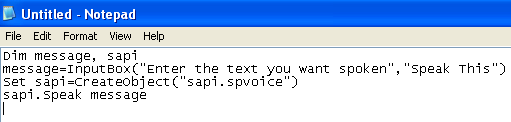
Step 1: Open Notepad and paste the following text into a new document:

Dim message, sapi
message=InputBox(“Enter the text you want spoken”,”Speak This”)
Set sapi=CreateObject(“sapi.spvoice”)
sapi.Speak message

It should basically look something like this:

make computer speak

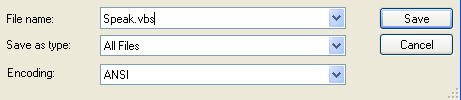
Now when you go to save the file, give it any name, but make sure you also type .VBS after the name. Also, for the Save as type box, choose All files instead of the default Text Documents.

make computer talk

Now double-click on the VBS file and you should see a input box where you can type in the text you want spoken! Go ahead and type something and click OK.

speak computer

That’s it! Your computer will speak to you in the default voice, which for me was some scary seductive male type of voice! What about yours? Enjoy (This would be fun to do on someone else’s computer as a joke.)


Please comment and let me know in either cases if it works for your or not? I'll be here to help you out.

Wednesday, March 24, 2010

How to Track a Stolen Cell Phone

Track a Stolen Cell Phone

Cell phones are very desirable pieces of technology, especially when they are popular models. They are costly, compact and easily lost or stolen. Be prepared and load your cell phone with the appropriate software beforehand, so you can track and retrieve the cell phone if it's stolen.

Difficulty: Moderate
Instructions
  1. Step 1

    Go to Microtechnologies to download the appropriate software to track a cell phone (see Resources).

  2. Step 2

    Click on the green box labeled, "MicroLMTS Lost Mobile Tracking System."

  3. Step 3

    Find "Installation Steps" in the right corner of the screen.

  4. Step 4

    Look over the cell phone icons. Locate the specific model of your cell phone and click on the heading above it.

  5. Step 5

    Find and click on "Installation Instructions."

  6. Step 6

    Read over the pre-installation instructions and complete each step. When you complete each step of the "Lost Mobile Tracking System," wait for a few minutes. The software starts itself the first time. If the software does not start on it's own, restart your phone. When the software launches, register your phone.

  7. Step 7

    Choose "Select Advance Registration Form Options Menu" from the Private Policy screen and complete the registration.


Tips & Warnings
  • The software notifies you when someone changes out the cell phone's SIM card. It lets you track the cell phone when it identifies a location. The software is also undetectable to thieves. There is no way to tell that it is installed on the phone.
  • Notify your cell phone carrier if the phone is lost or stolen. This is especially important if you do not have tracking software installed on the phone. Your carrier can track a stolen cell phone with GPS technology if it is being used with your current SIM card.

Sunday, October 18, 2009

PTA launches service to check how many SIMs are issued in your name

PTA service to find illlegal SIM cards.jpg

Amid rampant grievances of consumers against telecommunication service providers, finally PTA has launched a new service which would enable a mobile users in Pakistan to know all SIM connections details issued against their names by just sending their CNIC number to 668 (The ID card number should be written without “-” and space). The sms will cost only Rs. 2.30.

This would help in detecting real identification of a SIM user. This new service is part of PTA efforts to block all illegal SIMs and clean the data of the mobile phone users.

To block all illegal SIMs issued on your ID card number, you should go to the nearest Customer Care Center of that particular telecom company with your Original ID card and its copy. They will check database with your ID card number and will verify your complaint. After that your have to fill up one simple form and will have to submit it with your ID card copy and within 2 days those SIMs would be blocked.

Chairman PTA Dr Mohammad Yaseen said that ‘PTA is cognizant of grievances of telecom consumers and taking number of steps to resolve their issues. In this regard the PTA has revamped complaint handling mechanism of mobile companies, those of the PTCL and other telecom operators’.

A subscriber can launch a complaint with its relevant operator and in case complaint is not resolved consumer can approach PTA Consumer Cell.

No Right Click script

No Selection Script